
Content Creator’s Playbook: How to Capture XploreRide Hawaii Without Ruining the Magic
Author: XploreRide Editorial Team
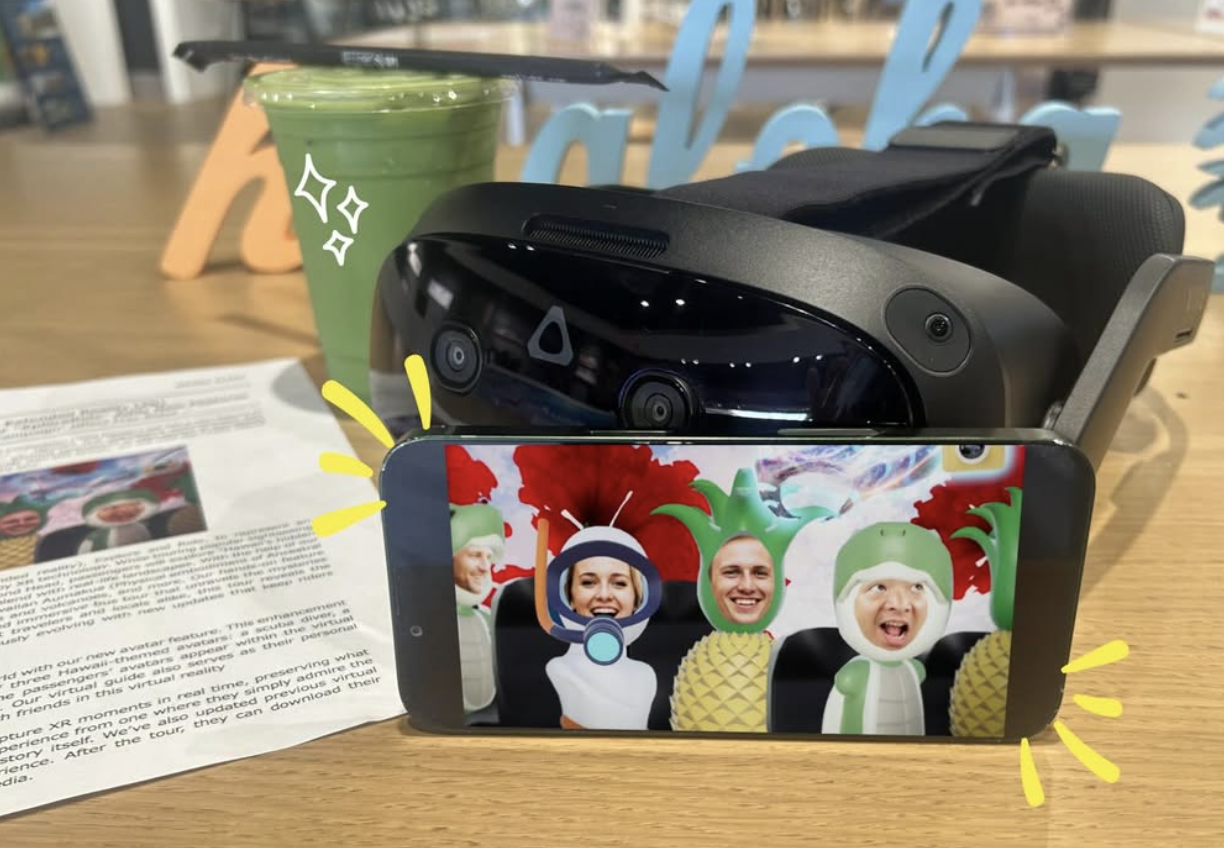
Travel creators constantly search for visuals that stop the scroll. Standard Waikiki beach shots and Diamond Head overlooks appear in thousands of feeds every week. XploreRide Hawaii delivers something rarer: real-time extended reality overlays synchronized with an actual moving bus through central Waikiki.
The experience combines a zero-emission electric bus, custom VR headsets, and location-synced digital content guided by an Aumakua spirit. Guests collect Mana Stones while coral reefs, marine life, and volcanic scenes blend with the live view outside the windows. For creators, the challenge is capturing that hybrid world without breaking immersion for yourself or other guests.
This guide focuses on practical approaches that respect the experience while producing shareable content.
See the Avatar Feature in Action
The official XploreRide Hawaii Instagram account regularly shares real examples of the avatar experience. The reel below shows how guests step into the virtual world as customized avatars and capture moments that are ready to post.
This type of official content gives creators a clear reference for the quality and style of images the avatar system produces.
Official Tools Built for Sharing
Since April 2026, XploreRide Hawaii has included a customizable avatar feature. Before the ride, guests can take a selfie that places their likeness onto one of three Hawaii-themed avatars: a scuba diver, a pineapple, or a sea turtle. These avatars appear inside the virtual environments during the tour.
The virtual guide also functions as a photographer, capturing commemorative images of guests within the VR scenes. In addition, participants can use hand gestures to capture VR moments in real time. After the ride, these photos become available for download and easy sharing on social platforms.
This built-in system gives creators high-quality, branded visuals without needing to film through a headset or disturb the flow of the experience. Details appear on the official Hawaii Underwater Adventure page.
Practical Filming and Photography Tips
The bus interior is climate-controlled and relatively dim once headsets are in use. Natural light from the windows provides the main illumination. Phone cameras generally handle the mixed lighting better than expected, especially when focused on the real-world scenery or on guests reacting to the content.
Recommended approaches:
- Capture the exterior of the bus and the Royal Hawaiian Avenue departure point before boarding. The vehicle itself is distinctive and photographs well.
- Film short reaction clips of yourself or your group putting on the headsets and first seeing the overlays.
- Record the real street views through the windows when the digital layers are active. The contrast between ordinary Waikiki traffic and the underwater or volcanic scenes creates strong visual interest.
- Use the official avatar photos and gesture-captured VR stills as primary content. These images already place you inside the story.
- Keep any personal filming brief and considerate of other guests. The ride lasts about 45 minutes and is designed as a shared immersive experience.
Avoid holding a phone in front of the headset for long periods. It reduces your own immersion and can obstruct the view of nearby passengers.
Content Ideas That Perform Well
Creators who treat the ride as a hybrid of technology demonstration and cultural storytelling tend to generate stronger engagement than those who simply post “look at this cool tour.”
Strong angles include:
- Side-by-side comparisons of the real window view versus the VR overlay
- Short vertical video of the moment the underwater environment first appears
- Behind-the-scenes explanation of the avatar selection and photo download process
- Honest commentary on how the seated, climate-controlled format differs from traditional outdoor activities
- Captions that highlight the cultural storytelling guided by the Aumakua rather than focusing only on the technology
Tagging the official account @xploreridehawaii and using relevant location tags helps the content reach interested audiences. The main XploreRide site and the Hawaii tour page provide accurate links for captions and stories.
Timing and Logistics for Creators
Departures run multiple times daily from the former T Galleria by DFS on Royal Hawaiian Avenue. Mid-morning and mid-afternoon slots often provide balanced natural light through the windows. Arrive early enough to complete the avatar selfie process without rushing.
The experience is available for guests aged 7 and older. There is no mid-ride exit. Large equipment bags follow standard bus policies, so plan to work primarily with a phone or compact camera.
Current schedules, pricing, and the latest feature information are listed on the Hawaii booking page.
Quick Reference for Content Capture
| Capture Type | Best Timing | Recommended Tool | Shareability Notes |
|---|---|---|---|
| Bus exterior & meeting point | Before boarding | Phone or camera | Establishes location and novelty |
| Headset fitting & first reaction | Start of ride | Phone video | High engagement for Stories and Reels |
| Real window + VR contrast | Mid-ride | Phone photo/video | Unique visual that stands out |
| Official avatar & gesture photos | During and after ride | Built-in system | Highest quality VR imagery; ready to post |
| Post-ride download & reflection | After return | Phone | Authenticity and call-to-action opportunity |
Frequently Asked Questions
1. Can I take photos and videos during the XploreRide Hawaii experience?
2. How does the avatar photo feature work?
3. Will filming through the headset produce good results?
4. Is the experience suitable for creating TikTok or Instagram Reels?
5. Do I need special permission to post content from the ride?
6. Where can I find accurate information about features and booking?
Create Content That Feels Different
Most Waikiki content looks similar. XploreRide Hawaii gives creators access to a moving, layered environment that does not exist anywhere else on the island. By using the official avatar tools, focusing on the contrast between real and digital views, and keeping personal filming considerate, you can produce distinctive posts without diminishing the experience for yourself or others.
Review the current departures, try the avatar feature, and capture the moments that only this ride can provide. Book your spot on the Hawaii Underwater Adventure page and turn the VR journey into content that stands out.